Showing posts with label Smartphone. Show all posts

Friday, January 4, 2013

smart lock appmedia v3101 apk app

Requirements: Android 2.1+
Overview: Smart Lock (App/Photo/Video Lock) Privacy Protector

 Smart Lock provides your privacy in mobile phone from others.
 You can meet here the most essential App which hides Apps/Pictures/Media Files by managing password.
 Do you mind somebody executing Apps or taking a look to pictures and media files on your mobile phone?
 Smart Lock provides you lots of features such as locking App, staying awake and locking auto screen-rotate.
 No one can see locked Pictures/Media Files!!!
 Language : English, Japanese, Korean
 # Please unlocks Pictures/Media Files before deleting Smart Lock. If you do not unlock them before deleting Smart Lock, you lost your Pictures/Media Files forever.
 The way to recover: reinstall Smart Lock > Setting > Recovering locked media
 # To prevent deleting Smart Lock, you don’t have to register Smart Lock as a locked App.
 Smart Lock itself registered as Default locked App. (This feature doesn’t support to partial phone. If supported, please register Default locked App.
 # If you see the message “No installed App” or don’t execute App in Home Launcher, that means you are using the feature ‘Hide App’ in Setting. It is possible to execute Smart Lock by Widget (2X1) or calling to dial #000.
 # Fake Mode: it shows fake error massage on lock screen. (Move to lock screen when pressing error message longer.)
 # While service icon is hidden, Smart Lock could not be locked or stable if lacking resources of mobile phone. We recommend not to hide icons.
 Main Features :
 - Locking App
 - Staying awake (Executing locked App)
 - Locking auto screen-rotate (Executing locked App)
 - Locking each Picture/Media File
 - Locking USB Storage
 - Change notification of mobile phone number
 Additional Features :
 - Default locked App (This feature doesn’t support to partial phone.)
 - Select lock type (Number/Text/Pattern)
 - Set up the digits of PINs (4/6 digits)
 - The Randomization of PINs
 - Change button size/image
 - Fake mode
 - Quick start (Executing Smart Lock by calling to dial #000)
 - Manage pictures by folders
 - Rename folder
 - Move pictures to other folder
 - Lock media files in Gallery
 - Hide service icon in Notification area
 - Widget: 1X1, 2X1 (Executing/Stopping service, Registering locked App, Move to Main page)
 - Start remote service (By SMS, enter @ap start + PINs and then press 'Call')
 - Set up schedule of service (Start/End time)
 - Set up time to lock for each App
 - Hide Smart Lock icon : It shows/hides Smart Lick icon in installed App list, Home Launcher.
 - Edit lock screen
 - Backup/Recovery
 - Slide show of locked media files
 - Sharing the locked image

 What's in this version:
 3.10.1
 * Reported bug fix
 3.10.0
 * Added text-password
 * change password authentication
 * Reported bug fix
 3.9.0
 * Modify lock service.
 * While service icon is hidden, Smart Lock could not be locked or stable if lacking resources of mobile phone. We recommend not to hide icons.
 * Reported bug fix
 3.8.1
 * Improveme the UI
 3.8.0
 * Improveme the UI
 * Reported bug fix
 3.7.8
 * Execute locked app
 * Reported bug fix
 3.7.7
 * Add lock settings (day of week)
 * Improve app lock
 * Reported bug fix

https://play.google.com/store/apps/details?id=ukzzang.android.app.protector
Download Instructions:
http://rapidgator.net/file/33232668/sl3101c.apk.html

 mirror:
http://depositfiles.com/files/e7a13v7qq

autokiller memory optimizer pro v810

Requirements: Varies with device
Overview:
 AutoKiller Memory Optimizer is not a regular task manager.

 AutoKiller is an award winner minfree tweaker, it fine tunes android systems inner memory manager to keep your device fast over time. As a side effect it also lowers battery consumption. Also includes a manual process/service manager.

 - ROOT REQUIRED to set minfree values, unrooted devices will not have this feature
 - if you have questions or you face errors please check home page or write mail
 - for more details see home page
 - donation is only available via paypal atm. because payed apps are not available in all countries yet

 Donators and PRO users receive additional features:
 - no ads
 - alternate preset enabled
 - Chuck Norris mode enabled
 - alternate preset (while screen is off)

 Please be careful, apps with very similar look and name are distributed, they can be malicious.

https://play.google.com/store/apps/details?id=com.rs.autokiller.pro
Download Instructions:Released by : chathu_ac
http://rapidgator.net/file/33240976/AKMOP_v8.1.rar.html

 mirror:
http://depositfiles.com/files/dvuaaks7j

ringtone maker pro v135 apk app

Requirements: ANdroid 1.6 and up
Overview: Ringtone Maker for Android™ using your MP3's and more!

 Ringtone Maker for Android™ using your MP3's and more!

 ☆☆ 50% OFF for a limited-time! Thank you for making our App so popular. ☆☆
 Make unlimited free ringtones with the music on your Android™ device. Advanced ringtone making options included! Based on technology from our award-winning web service (http://mobile17.com), you’ll choose from both popular edits generated by users online and options to “drag’n’drop” fine-tuned editing controls for making your own ringtones in just seconds!

 We offer the best ringtone maker in the Android market.

 Features:
 - Create unlimited ringtones, custom lengths... up to 40-seconds!
 - Make "text tones" of 6 seconds or less, using our same App!
 - NO ADVERTISEMENTS.
 - Supports popular audio-formats (MP3, M4A)
 - Fine-tuning buttons (+/-)
 - Suggested ringtone entry points from our website
 - Ringtones may also be used for alarm clocks & contacts
 - Installs ringtones automatically!

 To make a ringtone: 1) Open the 'Ringtone Maker' App. 2) Choose a song from your device’s ‘Music’ Library. 3) Use the ‘slider control’ and ‘fine-tuning buttons’ to create the ringtone of your liking! -- Instant previewing and unlimited, high-quality ringtone conversions are built-in.

 KW: ringtone maker, make ringtones, create unlimited ringtones, music ringtone maker, ring tones for free, mobile, 17, pro, creator, editor, your, own

 What's in this version:
 Twitter and Facebook sharing capabilities!
 Fine-tuning options automatically restart ringtone playback when editing!
 No editing restrictions! Up to 40 Seconds, unlike those other Apps.
 New language translations.
 Small updates and bug fixes.


https://play.google.com/store/apps/details?id=com.mobile17.maketones.android.paid
Download Instructions:Released by chathu_ac
http://rapidgator.net/file/33241897/RMP_v1.3.5.apk.html

 mirror:
http://depositfiles.com/files/kpvzqw3om
http://www25.zippyshare.com/v/90270754/file.html

autorun manager pro v36 apk app

Requirements: for Android version 2.1 and higher
Overview: Autorun Manager (formerly Autorun Killer) is an ultimate tool that lets you disable all the autostarting apps you don't need. Unfortunately this app is misunderstood many times so please read help carefully and/or mail the developer if you have questions.

 There are many applications that automatically start when you turn on your device; many of these you don't use or need, they just consume your valuable resources. This app sports a basic mode for the regular users and an advanced mode for power users with rooted devices.

 Autorun Manager in basic mode lets you manage applications that start up when you boot your device. Applications are terminated right after they start, but if the application is programmed to restart itself this can fail. Please note that some applications are written so that they cannot be stopped because of the android system design. These kind of applications are marked as 'self-restarter' and are better to leave enabled.

 In advanced mode you gain control over all the system-wide events and enable-disable application starts. This is the ultimate solution to control what you want to be started, but you also can break apps, so this feature is only for experienced users with rooted devices.

 Donators and PRO users receive additional features:
 - no ads
 - basic mode's prevent restart feature is selectable
 - can block more than 2 receivers in advanced mode
 - Chuck Norris mode enabled

 What's in this version:
 3.6:
 -support forum removed
 -advanced mode can refresh now
 -application size is reduced

https://play.google.com/store/apps/details?id=com.rs.autorun
Download Instructions:
http://rapidgator.net/file/33245018/am36.apk.html

 Mirror:
http://turbobit.net/kvexuocmi0eq.html
http://filedefend.com/gwxon29yvguf/am36.apk

dolphin browser beta v106 apk app

Requirements: Android 2.3+
Overview: Dolphin Browser Beta is the highest performing HTML5 browser available today.
 Dolphin Browser Beta (with Dolphin Engine) is an improved webkit version with extensive canvas enhancement and behind-the-scenes technology that makes it our fastest Dolphin yet.

 How fast? Dolphin Browser Beta's HTML-5 rendering is:
 • 5 - 10X faster than the default Android browser
 • 100% faster than Chrome (at times)
 • Initially scored over 450 when tested on HTML5test.com. (HTML5test.com is an industry respected tool for testing a browser’s support of HTML5)
 With a score of over 450, the highest tested, Dolphin has:
 • Full support for Web Worker
 • Full support for Web Socket
 • Full support for Web Audio
 • Support of Camera real-time video display
 • Support of Web Notification
 • Support of Web GL
 • Support of Web application customization
 Besides HTML5 enhancements, Dolphin Browser Beta includes all the features in Dolphin Browser (Formerly Dolphin Browser HD):
 ★ Sonar – Dolphin listens and lets you use your voice to search on the Internet, share on your favorite social networks, bookmark your favorite website, navigate and more.
 ★ Gesture - Let your inner artist out and create a personal Gesture (symbol) to access the mobile and desktop websites you use the most.
 ★ Webzine - Fast Web page loading, with no ads. Dolphin Webzine simplifies the way you read your favorite mobile content, from news to blogs and websites. Webzine is now available as an Add-on on the Android Market.
 ★ Speed Dial - Visit you favorite mobile and desktop websites on the go with one touch.
 ★ Tabbed browsing - No need to toggle between screens, tabbed browsing lets you open and switch between Web pages fast as lightning.
 ★ Sidebars - Make the best of mobile interface via Dolphin Sidebar.

https://play.google.com/store/apps/details?id=com.dolphin.browser.lab.en
Download Instructions:
http://rapidgator.net/file/33255201/...n-162.apk.html 

 mirror:
http://depositfiles.com/files/m9fjxwie1

mycalendar mobile v247 apk app

Requirements: Android 2.1 and up
Overview: The most popular calendar application on Facebook with over 100 million users is now here on Android! Now with MyCalendar Mobile, you will never forget your friends' birthdays again!

 Key Features:
 ☆ Import birthdays from Facebook
 ☆ Add birthdays of all contacts from your phone and add custom birthdays
 ☆ Customizable reminder settings: delivers notifications straight to your iPhone)
 ☆ Easily message your friends and wish them "Happy Birthday " along with custom message with just one click!
 ☆ No Ads

 We are working hard on our next version! More features coming soon! Thanks for your patience!

 SUPPORT: Please click "Settings" > "Report a Problem" from inside our application to reach us.

 What's in this version:
 Added "Reset Calendar"
 Added ability to change login email

https://play.google.com/store/apps/details?id=com.kfactormedia.mycalendarplus
Download Instructions:Released by chathu_ac
http://rapidgator.net/file/33258372/MCM_v2.47.apk.html

 mirror:
http://depositfiles.com/files/g5545zlnt

betbud sports tracker v53 apk app

 Requirements:
 Overview: Track your sports bets live!

 Bet on sports? Keep track of all your action with BetBud.
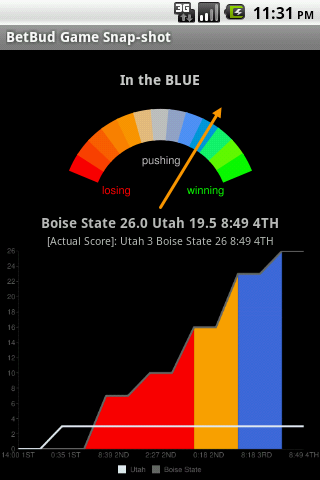
 Are you sick of navigating scoreboard apps trying to find your games and see how your bets are doing? BetBud makes tracking your wagers simple, you enter the bets you’ve placed, with the spread you have, and you can see how each is doing, at a glance, on the pending bet screen. They will all be there for you, no jumping between leagues or conferences to look at each score. You can also use BetBud to track your off ice fantasy pick 'ems.

 BetBud will also do the spread math for you, and have it presented right there with the score. For example, if you have Dallas -7.5 and the score is Dallas 17, NY Giants 3, the “spread score” is Dallas 17, NY Giants 10.5. It will also show how far off you are from total if betting Over/Unders, as well as forecast the final total as the game progresses.

 But it gets better, as the game is going on, BetBud will monitor the score and your spread, and calculate when the game is moving in your favor, or not in your favor. When it sees this happen, you will be alerted. This saves you from having to continually check your phone for scores **no more score watching!**, you will get the “Trending Alert” which contains the score, your spread and time remaining. The Trending Alert also ranks your bet’s current status in a color scheme system; this makes it even easier to see your status on all your bets at a glance:
 Green – winning big
 Blue - winning
 Gray – pushing
 Orange – losing
 Red – losing big

 Once your games are complete, they are kept in your completed picks view. This is useful for tracking your bankroll over time…how much did I win last week? The last two weeks?, etc. You can also label your picks so you can manage multiple books at a time.

 Because BetBud keeps the history of your picks, it is also has the ability to show varying statistics on your betting trends; what seems to work for you and where you should focus (excel at handicapping!). For example, you could look at your college football picks over the last month and determine that when betting spreads over 10, you seem to do poorly. There are several ways to filter these charts and view your bets from different perspectives, such as your top performing teams, who you’ve done best fading against, what spread amounts are most successful, what bet category has been working (favorites, overs, etc), best total amounts, full game vs. half bets, etc.

 BetBud currently supports Side bets, Totals (Over/Unders), Parlays, Draws (Soccer), in-game bets (1st/2nd Half, Quarters, Periods, 5 Innings), single team totals, Teasers, and Moneylines, for NFL, NCAA Football, NCAA Basketball, March Madness, NBA, MLB, NHL, WNBA, AFL, CFL, and Soccer (Argentina Primera, Brazil Serie A, English Premier League, French Ligue 1, German Bundesliga, Holland Eredivisie, Italian Series A, Mexico Primera, MLS, Spanish La Liga, UEFA Champions League, UEFA Europa League, UEFA Euro 2012, International Teams).

 This version has these functions unlocked without needing to install the Unlock Key:
 -Risk amount tracking $$$.
 -Parlay Entry.
 -Hides advertisements.
 -In-game bet tracking (1st/2nd half, Quarters, Periods, 1st 5 Innings, Last 4 Innings).
 -Extended statistics.
 -View Betting trends (from BetBud users).


https://play.google.com/store/apps/details?id=com.touw.android
 https://play.google.com/store/apps/details?id=com.touw.android.betbudkey
 Download Instructions: Released by Giga-Byte
http://rapidgator.net/file/33259755/BetBud_5.3.apk.html

 mirror:
http://depositfiles.com/files/wa89rbvrc

wi fi ruler paid wifi mngr v177 apk app

Requirements: 1.6 and up
Overview: Rule your Wi-Fi.


 A Wi-Fi manager that can do all the regular stuff plus:
 * Connect to open access points as you walk by
 * Not connect to "open" access points that are paywalls
 * You can set connect priority
 * Differentiate between two access points both called "linksys"
 * When connected will automatically check your connection (or say OK to click wall if that rule is set)
 * Option to exit with or without Wi-Fi enabled
 * Plays nice with access points your already have setup

 The is the Paid version:
 + No Ads
 + Option to start at boot
 + Option to run as a service

 Note: the option "Make Android Wi-Fi entry for APs we don't connect to" is enabled yet. Please just ignore that for now.

What's in this version:
 * Works better on Ice Cream Sandwich
 * Minor color fix

https://play.google.com/store/apps/details?id=com.hogdex.WifiRulerPaid
Download Instructions: Released by *DroidWRZ*
http://turbobit.net/iiqaaflkn3e3.html
http://depositfiles.com/files/69h96wy2y

autocad ws v152 apk app

Requirements: Android: 2.1 and up
Overview: Experience the freedom of taking your designs with you — wherever you go.
 AutoCAD WS enables you view, edit, and share AutoCAD® drawings with anyone, anywhere using your mobile device. Annotate and revise drawings in the , in the field, or in a meeting. Work on designs without an internet connection, and easily open DWG, DWF, and DXF™ files directly from email. Simplify design creation, review, and approval using powerful, built-in social design collaboration tools. Unleash the power of AutoCAD design beyond the desktop with AutoCAD WS.

 ?View
 • Open 2D and 3D DWG drawings uploaded to your free* AutoCAD WS online account
 • Work offline, then easily upload changes when you are back online
 • Upload and open files directly from email on your device
 • See all aspects of your DWG file, including external references, layers, and image underlays
 • Use multi-touch zoom and pan to easily navigate large drawings
 • Use your device’s GPS to orient yourself within a drawing
 ?Edit
 • Draw and edit shapes with accuracy using Snap
 • Select, move, rotate, and scale objects
 • Add and edit text annotations directly on your drawing; no need for paper mark-ups
 • Validate distance measurements in the drawing while you are onsite
 • Save edits to your AutoCAD WS online workspace, so your drawings stay up to date
 ?Share
 • Share your designs with others directly from the mobile app
 • Add comments and images and invite responses using the Design Feed
 • Print remotely from your mobile device using HP’s ePrint & Share service
 • Plot your designs to PDF or DWF and share them via email

 Join us on the AutoCAD WS Facebook page: http://www.facebook.com/autocadws
 Follow us on Twitter @AutoCAD_WS
 Follow our blog for updates: http://www.autocadws.com/blog
 Email inquiries to: feedback@autocadws.com
 * Free products and services are subject to the Autodesk, Inc. terms of use that accompany them.

https://play.google.com/store/apps/details?id=com.autodesk.autocadws
Download Instructions:
http://www.filecloud.ws/5pfhqdtjuekr

im pro v634 apk app

Requirements: 2.1+
Overview: Beep, Skype, MSN, Facebook Chat, AIM, Yahoo, ICQ, Google Talk, VKontakte & more.
 IM+ Pro. One app, all your messaging.


 IM+ Pro has all your messaging needs covered, regardless of whether you want to text your address book contacts or stay in touch with your IM contacts.

 Introducing Beep: free mobile-to-mobile in-app messenger.
 We figured you've been looking for a free alternative to SMS for a while now. And now we've got that right in IM+ Pro.
 Whenever you send and receive text messages, photos or voice messages, IM+ Beep will make sure that your message was successfully sent and notify you when it is safely delivered. Push will make incoming messages instantly pop up on your device.
 Always on, always instant, always fun.

 IM+ Pro supports all major IM services, including Facebook, Skype, MSN/Live Messenger, Google Talk, Yahoo!, AIM/iChat, ICQ, RenRen, Jabber, VKontakte, Yandex IM, Odnoklassniki.Ru and Mail.Ru Agent.

 Below you may find the list of other amazing features which will definitely take your mobile IM experience to the next level:
 - UI is optimized for both Android smartphones and Android tablet computers
 - Send text messages, photos, and voice notes
 - Group chats in Skype, MSN, AIM, ICQ
 - Chat history
 - Multiple accounts per service
 - Create personal and geo status messages
 - Customize your IMing experience with different sound notifications and emoticons
 - Typing notifications
 …and we're not done yet, new IM+ features will keep coming!

 What's new in version 6.3.4? You can see full changelog here
 Message queue: outgoing messages are queued if network is not available and will be automatically sent when network connection is restored
 New IM services: mig33, SINA Weibo, Mamba.Ru and Fetion
 Option to set Master Password
 Preview for images and videos in chat window

 File info
 Size: 6318017 bytes
 MD5: 08B5E0872983E49F577E081458A09EC2
 SHA1: 1F19DD8572CD656FA5FB6490B4E184AF7693892C
 CRC32: 2F406846

https://play.google.com/store/apps/details?id=de.shapeservices.implusfull
Download Instructions:
http://rapidgator.net/file/33271841/634n.apk.html

 Mirror:
http://ul.to/4w8imeg9
http://www.directmirror.com/files/17PLCXUZ

runtastic pro v333 apk app

Requirements: Android 2.1 and up , Lucky Patcher
Overview: Your personal tracking app for running, biking and other sports activities!

 Your personal tracking app for running, biking and other sports activities!

 The runtastic sportcoach uses the built-in GPS to map your activities and track your progress (distance, time, speed, calories, altitude, pace, etc.). Show your friends how active you are and share your success with them.

 PRO features:
 * Voice feedback during a workout: Get audio feedback for each mile or kilometer
 * Live tracking: Show your friends and family where you are
 * Cheering: Hear cheers and receive messages live from your friends and be motivated to go even further
 * Heart rate support: Polar Wearlink+ Bluetooth and Zephyr heart rate monitor
 * Split table with dynamic mile and kilometer split
 * Calorie goal: Set a specific calorie goal and use the voice feedback to reach your workout goal
 * Pace goal: Define your favorite pace
 * Geotagging: Take pictures during a workout and see these pictures online at your map trace
 * Weather and Temperature: Receive live weather information and save weather data automatically after a workout
 * Prediction of sunset and sunrise
 * Ad free

 Features:
 * Map your workouts in real-time with built-in GPS and monitor your progress (time, distance, speed, pace, calories, altitude, etc.)
 * Personal workout diary and metrics
 * Mapping: Detailed live mapping and historic mapping of previous sessions (Google maps)
 * Dashboard configuration: Display preferred statistics
 * Graphs: Get charts with altitude, pace, speed and heart rate information
 * Performance analysis with lap times
 * Enjoy your workouts with the integrated music player
 * Set goals for time and distance
 * Accurate calculation of elevation gain and loss
 * Manual entry of workouts: Add treadmill, spinning and weightlifting workouts
 * Monthly and overall metrics for distance, number of workouts, duration and calories
 * Share your success on Facebook and Twitter

 You can save all your workouts at http://www.runtastic.com. Using the online community you’ll get further analysis, metrics and comparisons to your friends. Additionally, you can choose a training plan and track your body statistics. Share all your workouts easily with the facebook and twitter connect.

 Check out the free runtastic app now!

 Make sports and fitness even more fun with the brand new runtastic PRO with a lot of new features and benefits!

 What's in this version:
 Improvements:
 * Larger text size for tutorial screens
 Bug Fixes:
 * Black background of sport type selection dialog for Android 2.x devices
 * Minor bug fixes

https://play.google.com/store/apps/details?id=com.runtastic.android.pro2
Download: Released by chathu_ac
http://www.directmirror.com/files/C3K4A0WZ
http://ul.to/zdqlmx5h

procapture v1522 apk app

Requirements: Android 2.2 and up
Overview: Capture photos like a pro with ProCapture.

 ProCapture adds advanced features to the Android camera experience. Multiple advanced shooting modes supported: Timer, Burst, Reduced Noise, WideShot and Panorama.
 Free version "ProCapture Free" available with max resolution capped to 3.2 Mega-Pixels. TRY IT FIRST!

 Please note that this app is not for video capture.

 - Panorama mode automatically links together up to 12 photos to produce a high resolution panoramic image providing the ability to zoom in on small details. Output panorama has the highest resolution and best quality among competitors (depends on phone memory).
 - WideShot mode automatically links together 3 photos to produce a high resolution wide image.
 - Reduced Noise mode captures 2 photos and combines them in order to reduce noise in the photo by about 30%.
 - Shoot better photos with 2 different on-screen composition aids: grid and Fibonacci spiral.
 - Real-time on-screen histogram helps you get better exposed photos.
 - Simple UI with easy access to all features.
 - On-screen remaining photos indicator.
 - Ability to configure volume buttons for zoom or photo capture.
 - Save to internal or external storage (please email us if external storage is not supported on your phone).

 What's in this version:
 Fixed issue with GS3 hanging if flash is used with touch-to-focus
 Touch-to-focus can be now canceled using the back key
 Added on-screen indicator when a scene mode is used
 Added 8MP resolution for the Motoluxe (3200x2400)

https://market.android.com/details?id=com.neaststudios.procapture
Download: Released by chathu_ac
http://rapidgator.net/file/33293427/...5.2.2.apk.html 
http://ul.to/ve4kbsta
http://www.directmirror.com/files/1Y4ZRVAR

scanthing ocr v122 apk app

Requirements: Android 2.2and up
Overview: Your paperless life starts here!

 Scanthing extracts text from pictures and documents and allows you to search for them by keywords on your phone using OCR (Optical Character Recognition) technology. Its the only Document Scanner you need.

 Your paperless life starts here! Scan documents and images, convert to text and search by keywords. Scanthing uses a commercial quality optical character recognition (OCR) engine to provide superior text extraction to other apps on the marketplace.

 Please follow us on http://twitter.com/#!/scanthing to get updates first on new enhancements.. If you have an issue PLEASE LET US KNOW on mail@scanthing.com we pride ourselves on responding promptly.

 Feature List:
 * Capture image using our dedicated camera, your mobile’s own camera or existing image from gallery
 * Rotate and crop the text you want to extract.
 * Then extract the text using our powerful server-side OCR that runs in the background so you can carry on using your phone.
 * Works with all printed typefaces, but please note it will not be able to read your handwriting.
 * Use with Google Translate on your phone to convert from one of the 33 languages we support to another.
 * Fully secured HTTPS connection to our servers. We do not retain your image or extracted text after processing.
 * After Scan, search for your documents by just using a few keywords.
 * Share image or extracted text by Email, Dropbox, Evernote, Google Translate and other apps.
 * Add more images to existing documents, see documents by thumbnails.
 * Covert many documents at once in a batch, because the OCR processing is done on our servers the performance of your phone is not affected.
 * Associate Tags with your documents and then use Tags to find documents fast when your on the move.
 * Support for 33 languages, just set your default version in the settings.

 What's in this version:
 Fixed a problem using the standard device camera
 Fixed a problem with Text-To-Speech and JellyBean (4.1) devices
 Fixed a problem with the cropping tool with newer devices

https://play.google.com/store/apps/details?id=com.scanthing.android
Download: Released by chathu_ac
http://rapidgator.net/file/33320533/...v1.22.apk.html 
http://ul.to/k9hovf70
http://www.rapidfileshare.net/9vx27v...v1.22.apk.html 
http://www.directmirror.com/files/0PAE0SSL

perfectly clear for android v108 apk app

Requirements: Android 2.3.3 and up , Lucky Patcher
Overview: Perfectly Clear has arrived for the world’s most popular mobile operating system, Android.


 Athentech Imaging, the makers of Perfectly Clear, have been the industry leaders in Automatic Image Correction for years. Our powerful and desktop and intelligent LAB software have led the way for an award winning iPhone app and now Android app.

 Camera phones lack the quality and sophistication that dedicated cameras have and often leave you with underexposed, washed out photos. Perfectly Clear Automatically corrects these images and turns them into stunning memories for years to come. Now, from the everyday smart phone user to the experienced mobile photographer, there is an intelligent way to automatically correct your photos anywhere, anytime.

 With the new, completely redesigned interface, no effort is required to create and then share beautiful looking images with this fun-to-use app. Watch as Perfectly Clear automatically peels off your original photo to reveal a vibrant, color corrected photo with crisp details you couldn’t see in your original. Want more then automatic? Perfectly Clear lets you use our 10 patented correction to further customize your image the with the use of easy, intuitive sliders.

 See for yourself the power of Perfectly Clear

 What's in this version:
 V. 1.08
 -Fixed: Issue receiving image intents from cloud services like Picasa
 -Fixed: stability issues

https://play.google.com/store/apps/details?id=de.worldiety.athentech.perfectlyclear
Download: Released by chathu_ac
http://rapidgator.net/file/33323214/...v1.08.zip.html 
http://ul.to/4eddv59u
http://www.rapidfileshare.net/sfh1pc...v1.08.zip.html 

advanced clock widget pro v0719 apk app

Requirements: Android OS 2.2+
Overview: Small, fully configurable and battery friendly widget with:


 On HONEYCOMB or ICECREAMSANDWICH a reboot MIGHT be needed to make the widget show up on the list (this is not my fault). Please try free version first!
 Small (<100kb), fully configurable and extremely battery efficient **WIDGET** with:
 - Digital clock
 - Customizable fonts and colors (for transparent bg set alpha to 0!)
 - Multiple layout templates
 - Battery status (with time remaining)
 - Network operator / WiFi network name
 - World clock with timezone support (just add multiple widget and set manually weather/location in the options)
 - Current location, date and uptime
 - Current and tomorrow weather
 - Next alarm
 and more...

 Again, this is a *WIDGET*! Long press on your home screen to add it, stop giving "1 star" saying that it does not open!
 - If you like the widget -> RATE IT!
 - If you have problems -> SEND ME AN EMAIL!
 - I cannot answer comments -> SEND ME AN EMAIL!
 - Exclude this from your task killer if you have one
 - DO NOT move to SD! Widgets are not working on SD (they will disappear at reboot!)

 This version has configurable tap to launch feature for clock hours/minutes (2 different actions, PLEASE be patient when you configure it, list MAY TAKE A WHILE TO LOAD if you have many apps installed), settings save/restore and custom text areas.

 Coming on next releases (stay tuned!):
 - More templates
 - 2x1 sizes

 What's in this version:
 0.719
 - Added "hide from launcher option"
 - Added new template "centersplit"
 - Added French translation (thanks Johan!)
 - Added Russian translation (thanks Giomo!)

https://play.google.com/store/apps/details?id=org.zooper.acw.pro
Download Instructions:
http://rapidgator.net/file/33214008/0719.zip.html

 Mirror:
http://turbobit.net/7qamq85qsmwz.html
http://filedefend.com/iegitnnbp260/0719.zip

freedi youtube downloader v226 adfree

Requirements: Android v2.1+
Overview: Save your favorite YouTube videos. Download and transform them into MP3/MP4/AAC formats. Download multiple videos at the same time. Edit playlists of downloaded files and auto-redownload.

 Save your favorite YouTube videos. Download and transform them into MP3/MP4/AAC formats. Download multiple videos at the same time. Edit playlists of downloaded files and auto-redownload.

 Features:
 - Download and save all your favorite YouTube videos;
 - Convert them into various formats;
 - Keep your own copy of them;

 Recent changes:
 - 2.2.6 Fix music download problem and Facebook share problem;
 - 2.2.4 Add image cache to speed up thumbnail loading and reduce network connection.

http://slideme.org/application/freedi-youtube-downloader-0
Download Instructions:
http://rapidgator.net/file/33214358

 Mirror:
http://turbobit.net/fkfe88lldbg8.html
http://depositfiles.com/files/5s4jvc7e6
http://mir.cr/1LPSISM8

super download full v011 apk app

Requirements: 2.2 and up
Overview: Download web files much faster by using wifi and mobile data at the same time! Share or open a link from any program, like the web browser, and download it at speeds up to two times faster than usual.This is the only downloader tool that can download using wifi and mobile data connection simultaneously! WARNING: Some features require a rooted device.

 [break]
 WARNING: Price is set very low for the full version, because the application is still in beta stage and some important features are not implemented yet. I'd set it to 0.10 but play store minimum is 0.50 EUR / 0.99 USD.
 DESCRIPTION:
 Download web files much faster by using wifi and mobile data at the same time!
 Share or open a link from any program, like the web browser, and download it at speeds up to two times faster than usual.
 This is the only downloader tool that can download using wifi and mobile data connection simultaneously!
 IMPORTANT NOTES:
 - Since this program uses mobile data connection, by using it you may incur in additional charges from your network operator.
 - To unleash its full potential, this program needs good (and balanced) wifi and mobile reception/bandwidth.
 - Using both connections is not supported on all devices / rom combinations.
 - Some web servers may provide insufficient functionalities on the requested files.
 - The Lite version has a filesize limit of 50 megabytes.
 USAGE:
 Just click on a link or open a remote file: if the file type is recognised by Super Download, it will start getting it.
 If this method doesn't work, try click-and-hold on the link, select "share with" and choose SuperDownload.
 Finally, you can copy and paste a url in the "add url" dialog.
 PLANNED FEATURES:
 - Multiple files
 - Pause
 - Resume broken downloads
 - Other ways of speeding up downloads
 - Visual tweaks

 What's in this version:
 0.10
 - attempt to fix 4g and other weird interface names
 - reverted a change made in 0.9 that could lead to crashes on some devices

https://play.google.com/store/apps/details?id=it.opbyte.superdownload
Download Instructions:
http://rapidgator.net/file/33206338/

 mirror:
http://www.filecloud.ws/4ofy4qa9f7md
http://depositfiles.com/files/b4i1akntm

Thursday, January 3, 2013

root toolbox pro v208 apk app

Requirements: Android 1.6 and up
Overview: Root, Busybox and S-off are require to use most features in this app.

 Current Features:
 -Reboot/Recovery/Bootloader/HotBoot/Download-Mode
 -SetAPN/Backup/Restore
 -Wipe Delvik
 -Wipe Battery Stats
 -Remount System
 -Backup/Restore/Flash/Erase Recovery
 -Backup/Restore/Flash/Erase Boot
 -Fix permissions
 -Launch Hidden Menu
 -Fix Market Links
 -Sim Settings
 -Themes chooser options
 -Restart Status Bar
 -Dual Mount Sdcard
 -System App Remover/Backup/Restore
 -Enable/Disable Boot Animation
 -Change boot animation
 -Read Logcat
 -Display Device Information
 -Download Update.zip To Change Sdcard Read Speed
 -Wipe All Webview Cache
 -MD5 Sum Fixer
 -Debug Message
 -Install Cyanogenmod's DSP Manager

https://play.google.com/store/apps/details?id=com.lukemovement.roottoolbox.pro
Download: Released by chathu_ac
http://rapidgator.net/file/33326660/...2.0.8.zip.html 
http://www.rapidfileshare.net/8m57r3...2.0.8.zip.html 

xphonepro phone and contacts v22 apk app

Requirements: Android 2.1 and up
Overview: Elegant photo contact dialer!
 xPhone provides an incredibly user-friendly interface for quick and effective management of your photo contacts.

 Elegant photo contact dialer!
 xPhone provides an incredibly user-friendly interface for quick and effective management of your photo contacts.

 Features:
 • Organize your favorite contacts into groups
 • Quickly navigate to a group by swiping your finger
 • Tap on bottom group indicator to hand pick a group
 • Tap on any contact to execute assigned action
 • Long tap to view full contact's details
 • Call, send message, locate address, browse website, ...
 • Launch Contacts or Phonepad by shortcuts
 • Customize your wallpaper and avatars
 • And much more...
 If you have comments or feedback on our app, please send to support@pixelrush.net as there's no way to reply to comments in the Android Market. Thanks! PixelRush Team

 What's in this version:
 • Added: Intelligent search through all contacts fields
 • Fixed: Support RTL languages
 • Fixed: Scrolling in lists
 • Fixed: Date of birthday
 • Minor fixes and optimizations

https://market.android.com/details?id=net.pixelrush
Download: Released by chathu_ac
http://rapidgator.net/file/33328934/..._v2.2.apk.html 
http://www.rapidfileshare.net/49i6ja..._v2.2.apk.html 
http://www.directmirror.com/files/0MPBWKYA

ultra keyboard 6 v641 build 111 apk app

Requirements: 1.5+
Overview: Ultra Keyboard is an advanced keyboard with many features geared towards reinventing the Android keyboard experience.

 Word Suggestions:
 Like many keyboards, Ultra suggests words while you type. The suggestions box on Ultra is designed to be fast and easy to use, with many unique features. Press the drop-down arrow to quickly view all suggestions.

 Compact Keys:
 Are you frustrated trying to type in portrait mode, because the keys are too thin? Ultra combines keys so they're easier to press. Type like you normally would, and Ultra will guess what word you meant to type. If it's wrong, you can always choose the right word from the available suggestions.

 Secondary Characters:
 Hold down certain keys to enter secondary characters.

 Arrow Keys:
 For devices that don't have a track pad or navigation button, Ultra provides arrow keys that let you quickly move the cursor through text.

 Multi-Touch:
 You can press multiple keys at once without missing keys (*for devices that support multi-touch). Slide your finger from the shift key to quickly enter a capital letter. Slide your finger from the view key to enter a number or symbol.

 Word Tracing:
 Have you heard about that popular keyboard that lets you trace out words instead of typing each letter? Ultra can do that too.

 Multiple Languages:
 Ultra comes with built-in support for the English language. There are other language dictionaries available that you can download right from the keyboard.

 Custom Dictionary:
 Add words to your own custom dictionary.

 Word Replacements:
 Type "brb" and Ultra will enter "be right back". There are pre-defined replacements, and you can add your own.

 Black List:
 Hold down a suggested word and you can easily stop it from showing up again.

 Custom Themes:
 Ultra supports many keyboard themes available from the market (both free and paid). You can also use Ultra's built-in theme editor to create your own themes, or edit existing themes (including custom fonts!).

 Speech-to-Text:
 Speak to Ultra Keyboard, and it will use Google's web-based service to transform your spoken words into text. You can also dictate punctuation.

 Translation:
 Quickly translate your text to over 50 different languages.

 Camera Mode:
 Activate your camera to see where you're going while you text your friends.

 Tool Bar:
 Ultra's tool bar provides a ton of features in a tight space. Flick the tool bar left or right to scroll through the available buttons. Quickly change many settings, navigate through text, cut and paste, change dictionaries, change themes, insert emoticons, and more. Show or hide the tool bar by pressing your device's menu button.

 Customizable Settings:
 Almost everything in Ultra is customizable. Don't like the compact keys? Disable them. Don't use a few of the tool bar buttons? Remove them.

 What's in this version:
 General:
 � Fixed issue where you couldn't type in certain text fields (such as when adding a custom word).
 Keyboard:
 � Quicker loading across orientation changes.
 Themes:
 � Fixed incorrect color chooser layout when changing orientation.
 � Fixed color palette positioning issues.
 Tool Bar:
 � Fixed scrolling and performance issues.
 � Fixed incorrect item position after changing the theme.
 Typing:
 � Better handling for sudden motion "jumps" on certain touch screens (increased accuracy!).
 � Space bar now registers on release, not press.
 � Added Gestures as a typing protection component.

https://play.google.com/store/apps/details?id=com.binarybulge.android.apps.keyboard.full
Download Instructions:
http://rapidgator.net/file/33347998/111.apk.html

 Mirror:
http://ul.to/v7k3dccd